Import Contacts Into CRM: The Right Way (CSV→Cash)
Import Contacts Into CRM: Bad data kills deals. CSV imports only magnify the problems tenfold. So if you must import, do it right. Then take steps to make imports an obsolete marketing nightmare.

This is NOT your grand-pappy’s marketing newsletter! Ninja Tribe Uprising: Join the movement!! >>
This guide shows a clean import strategy. But it also shows you a fast exit plan.
We use ROI Ninjas CRM for native capture, follow-up, and reporting. The smart way small businesses win. Clean imports when you need them. But native capture wins every day.
Just understand that importing via CSV is a temporary solution at best. It is NOT the hero of your small business story or this guide.
Why CSV Imports Can Go Sideways (And Cost You Sales)
The short version: Imports are a symptom of duct-taped solutions. Not a system.
- CSVs steal hours, kill momentum, and hide attribution.
- Native capture inside ROI Ninjas CRM records consent, source, and tags at the moment of lead creation. Try that with a CSV import.
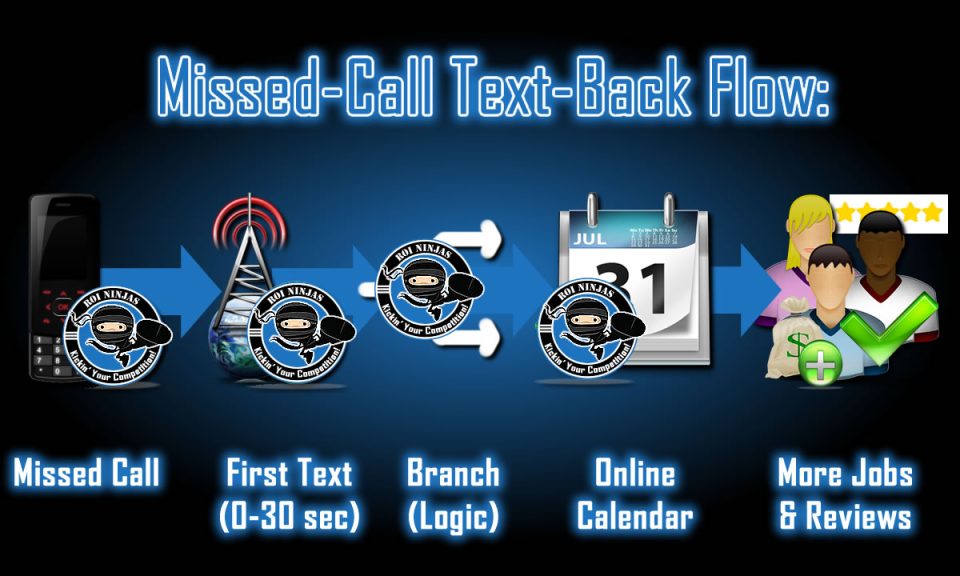
- Upgrades like Missed-Call Text-Back and online calendar integration turn more contacts into booked calls automatically.
Corrupted data kills deals in their tracks.
- Dirty Data = Dirty Pipeline: Typos, merged names, special characters.
- Consent Gaps: No opt-in proof. Risk rises. So do complaints. Delivery drops.
- No Day-1 Automation: You import. Then you wait. Leads cool off.
Pro Tip: Use ROI Ninjas CRM forms, bookings, and chat. Consent and source get captured automatically. No guesswork. No bullshit. Also, no export/import hassles to deal with.
Imports Are A Symptom, Not A System
Slow and dumb is no way to run a business. But a smart platform like ours makes your work far less chaotic. So imports become rare.
Why? Because ROI Ninjas CRM natively captures leads, records consent, source, and tags at contact creation. For example, a simple contact form captures name, email, and phone number. The lead/contact is instantly created, documents consent, and applies tags.
Also, quick wins like Missed-Call Text-Back, online calendar booking, and follow-up/nurturing can all be triggered automatically. Try that with a spreadsheet.
Start Capturing Leads: Check out ROI Ninjas CRM Pricing Plans.
Import Contacts Into CSV:
30-Day CSV Exit Plan
A quick and easy way to escape Import Contacts Into CSV hell.
- Week 1: Turn on forms, booking, webchat widget, call tracking, and MCTB.
- Week 2: Set default tags and sources. Add 15-minute reply alerts.
- Week 3: Launch 7-Day “Wake the List” sequence. Re-permission old lists.
- Week 4: Review dashboard – replies, booked, show rate, won, revenue.
Download: CSV Exit Plan (One-Page Checklist). *Coming soon!
CSV vs Native Capture (Why Switch Now)
CSV is busywork. Native capture is revenue (and less work).
|
CSV Imports (Old Way) |
Native ROI Ninjas CRM |
|
|---|---|---|
|
Time per batch |
1-4 hours |
0 hours |
|
Consent & source |
Often missing |
Captured |
|
Speed-to-lead |
Delayed days |
Instant alert + MCTB |
|
Attribution |
Fuzzy at best |
UTMs + tags |
|
Errors |
High |
Low/few |
|
Outcome |
Busywork |
Booked calls & sales |
See one way that ROI Ninjas CRM captures leads automatically on the fly: Simplified Funnels for SMBs.
Make the Switch in 30 Days: ROI Ninjas CRM Pricing Plans
The 15-Minute Clean Import Checklist
Prep Your CSV (do this before you touch the CRM)
- Columns: FirstName, LastName, Email, Phone, Tags, Source, Consent, PipelineStage, Status.
- Normalize names (proper case). Validate emails. 10-digit phone numbers with no dashes, spaces, letters, or special characters.
- Split multi-values with ( ; ) or use one value per cell.
- Remove known hard bounces and spam complainers.
- Keep consent values explicit: OptIn, Transactional, Unknown.
Map Fields to ROI Ninjas CRM
- Create custom fields only if they drive automation or reporting.
- Minimum map: First, Last, Email, and Phone.
- For Opportunities: Pipeline Stage, Status.
- Nice to have (or add during import): Tags, Source, Consent.
Tag + Source + Stage On Import
- Tags: segment by origin (csv-2025-10, workshop-optin-2026, etc.)
- Source: The truth, not “manual.” Use the real channel/campaign.
- Pipeline Stage: Lead, Hot Lead, MQL, SQL, Customer/Sold. Start accurately.
Grab the CSV Field Map Template (Free) *Coming soon!
Turn Rows Into Revenue
(Switch These On First)
7-Day “Wake The List” Sequence
- Day 0: Value email + clear booking link.
- Day 1: SMS nudge (if they consented).
- Day 3-7: Proof, offer, reminder. Keep each message single-focused.
Learn more in Follow-Up or Fail.
Missed-Call Text-Back (MCTB) Safety Net
- Every missed call gets a fast text.
- Offer a reply keyword and a booking link.
- Route hot replies to a human fast.
Speed-to-Lead Rule
- Under 15 minutes or it’s ice.
- Use inbox alerts, the mobile app, and round-robin.
Learn more about our Speed-to-Lead Playbook here. Because speed is everything to your leads.
Import Contacts Into CRM:
Track What Matters (Not Nerd Salad)
UTM Hygiene + Source
- UTMs on every outreach.
- Mirror campaign names in your CRM.
- Pipeline and revenue are only as accurate as the data going into your CRM.
Stop pretending or guessing what your numbers mean without the Marketing Attribution Basics.
GA4 Events to Mirror Pipeline
- lead_submitted, call_connected, appointment_booked, deal_won, etc.
- Send events via GTM with server-side if available.
What “Send events via GTM with server-side if available” means:
The goal: make sure your key actions (Lead, Call, Appointment, Sale) get tracked reliably within Google Tag Manager (GTM). Even when browsers, ad-blockers, or iOS (Apple) try to kill your tracking.
Two Ways To Send Tracking Events
#1 Client-Side (the normal way)
- Your visitor’s web browser fires tags (GA4, Google Ads, Meta Pixel, etc.) directly from the page.
- Pros: Easy to set up, free.
- Cons: Ad-blockers and iOS kill a lot of it. Also, too many tags will slow down pages, and you have less control over what leaves the browser.
#2 Server-Side (the upgrade)
- The web browser sends one lightweight hit to your tagging server first (your subdomain).
- Your server then forwards clean, standardized data to GA4, Google Ads, Meta, etc.
- Pros: Better data survival, faster pages, less ad-blocker loss, and more control (privacy filters).
- Cons: Costs a bit to host, takes an hour or two to set up.
GTM Client-Side/Server-Side Summary
Client-side is fine to start. Server-side is a durability/accuracy upgrade. So use it when ads matter and you want numbers you can trust.
Weekly Dashboard
- Replies, Booked Calls, Show Rate, Deals Won, Revenue, Payback Period.
Starter: Client-side GTM is fine.
Scaling: Add server-side when ad spend or traffic grows. The revenue truth lives in the CRM.
Our guide, Track Leads Effectively, shows you step-by-step ways to track your leads and what you need to do.
See also our guide on ROI Tracking With CRM to connect dashboards to money, not vanity metrics.
Still not sure where to begin with your marketing? Get a FREE Marketing X-Ray Report–no more mysteries!! >>
7 Ways ROI Ninjas CRM Captures Leads Automatically
- Embedded forms that record consent and source.
- Calendar booking with reminders and tags.
- Chat widget that converts anonymous visitors into contacts.
- Call tracking with outcomes and recordings.
- Missed-Call Text-Back that saves lost leads.
- Facebook and Google Lead Ads sync.
- Webhooks and Zapier for anything custom.
Start Capturing Leads: ROI Ninjas CRM Pricing Plans
Import Contacts Into CRM: Micro-Win
From CSV Chaos to Booked Calls in Three Weeks
Before:
Weekly CSV import. Email unsubscribe and DND chaos. Manual list hygiene.
After:
Native forms, order capture, MCTB, 7-day wake sequence, list-cleaning automation.
Results:
Booked appointments up 38%. Class attendance up 21%. More sales.
Time Savings:
About 3 – 5 hours weekly. No more CSV wrangling. No more squirrel-herding.
See how we turn interest into sales with Turn Clicks Into Customers.
What To Do With Bad Or Old Contacts
Re-Permission First
- Single, plain-text email. “Still want this?” Include a one-click keep link.
Suppress The Dead
- No engagement after the re-permission? Suppress for 90 days.
- Then archive or delete if they never bought or engaged.
Delete Junk
- Hard bounces, spam complaints, unsubscribes, DND, obvious fakes.
- Get rid of them all.
- Protect your sender score like your business really depends on it. Because your revenue depends on it.
Implementation In ROI Ninjas CRM
Fields & Tags to Create
- Fields: consent_status, pipeline_stage, utm_campaign.
- Tags: source/date (newsletter-2025-11), campaign tags (csv-warmup).
Import Workflow
- Create a list from the import tag.
- Trigger: Contact Tag Added = import-YYYY-MM.
- If consent_status = OptIn → start 7-Day Wake The List sequence.
- Else → send re-permission email only.
- Always → assign owner, set next task, log source.
Suppression Rules
- Global DND for spam complaints and hard bounces.
- Exit all workflows on unsubscribe. Log the reason.
Import Contacts Into CRM: What’s Next
- Start Capturing Leads: Turn on forms, bookings, chat, and MCTB today.
- Marketing X-Ray Report: We fix tracking, SEO, and follow-ups.
- CSV Exit Plan (Free): One page. No fluff. Make imports rare in 30 days.
- Subscribe to Ninja Tribe Uprising: Get plays that turn clicks into sales.
FAQs
First name, last name, email, phone, and consent at a minimum. You can also include tags (if any) or add them in ROI Ninjas CRM. You can also create opportunities at the same time during an import operation.
Yes. But you need to do a re-permission first. Suppress (or delete) chronic non-engagers.
Within 15 minutes. Then run a simple 7-day sequence.
Add unique UTMs to every campaign, mirror events in GA4, and use your CRM as the source of truth.