Lead Scoring for SMBs: A Simple, Strategic Approach to Prioritize Sales
Lead Scoring for SMBs helps you spot your best opportunities for sales fast. It shows which leads are hot, warm, or cold. So you stop guessing and wasting time to start closing more deals. This guide keeps it real, simple, and useful for small business owners. Dig in.

Stop the guessing game. Use native scoring, bands, and instant actions. Lead Scoring in ROI Ninjas CRM Is Easy!! >>
So, Why Does This Matter Now?
Ad costs are up. Time is tight. Also, most leads are not equal. So speed helps, but your target matters more. However, lead scoring points you at the money first.
What you’ll get here: A simple 100-point model you can launch today. Signals that matter: fit, intent, engagement, and recency. Clear actions for different types of leads (lead bands). Built-in scoring in ROI Ninjas CRM, so no workflow is required. Additionally, a 30-minute weekly tune-up plan.
Why Use ROI Ninjas CRM for This?
Because it watches the actions of your leads and customers in real-time. Forms, clicks, page views, replies, purchases, and bookings all count. Scores update without you touching anything. So hot leads trigger tasks, alerts, and fast call prompts. Also, text, email, and social chats live in one place. Reporting shows which channels create top leads. Finally, you see what to scale and what to stop.
Read this, turn on built-in Lead Scoring (Engagement Scoring), and go. So then your team will always know who to call first.
Want a cheat code? Open the Lead Scoring builder in ROI Ninjas CRM. Define your rules and publish. Start seeing more wins this week.
Want to learn more about our platform basics? Check out our introductory article, ROI Ninjas CRM.
What Is Lead Scoring for SMBs?
You have a limited time and budget. So lead scoring helps you focus on likely buyers. Your team works smarter, not harder. Follow-up gets faster and more relevant. Also, sales cycles shorten. This causes close rates to rise.
In short, it sorts buyers from browsers. So you can focus your time talking to people ready to buy now. Nurture the rest with useful steps and time-based prompts. Stop wasting time on tire-kickers and price shoppers who never intend to buy.
Also, the native scoring engine in ROI Ninjas CRM removes guesswork automatically. You’ll see who is ready, who needs time, and who is cold. Use optional automation only if you want actions to fire when a score changes.
Learn more about lead tracking, opportunities, and pipeline visualizations here: Track Leads Effectively.
How To Set Yours Up in 60 Minutes
Follow these steps to streamline your sales cycle:
Step #1: Keep It Simple (Define Your “Fit”)
Write down who buys from you now. But only use your best customers, not all customers. Note demographics, like age, gender, and marital status. Note common pain points and buying triggers. This becomes your Ideal Customer Profile (ICP). We call it your Bullseye.
To learn more about fit and positioning: 10 Customer Acquisition Basics & Relationships Build Your Brand.
Step #2: Build A Simple 100-Point Model
Keep the math easy to follow. The more complex it is, the more likely you’ll have problems with it later. So use a 100-point cap. Score four buckets: Fit, Intent, Engagement, and Recency.
- Fit (0-30): Use the Bullseye traits. Location, industry, company size, and role.
- Intent (0-30): Appointments, pricing views, cart starts, and form submissions.
- Engagement (0-25): Email opens, clicks, replies, time-on-page, video views.
- Recency (0-15): How fresh is their last activity? Frequent activity scores higher.
Add a few negative scores for disqualifiers. But start simple. Then you can adjust and tune the weights as you go.
External Link: Lead Scoring (Wikipedia).
Step #3: Map Signals You Can Track
Decide where each signal comes from. Use form fields, UTM parameters (special links), appointment events, and page tracking. Count replies and clicks, not just opens. Because clicks reflect real interest. Standardize fields so data stays clean.
Learn more about fixing your weak web pages before you score them, read Turn Clicks Into Customers.
External Link: UTM Parameters explained (Wikipedia).
Step #4: Set Thresholds And The Next Move
Make the score do real work, such as driving actions, not reports. Use the four bands or buckets in #2 so no one’s guessing. Here’s what it looks like:
- A-leads (70-100): Call within 5 minutes. Text if no answer.
- B-leads (50-69): Quick call or text. Ask one qualifier. Book an appointment.
- C-leads (30-49): Short nurture. Send one strong next step. Track clicks.
- D-leads (0-29): Long-term nurture. Keep them out of expensive campaigns.
Back this with clear Service Level Agreements (SLAs). For example, an A-lead gets a call within five minutes and a text if no answer. If an A-lead has no touch in fifteen minutes, alert the owner/manager immediately. No exceptions.
Want a simple flow that matches these lead bands? See our article, Simplified Funnels for SMBs.
External Link: Response Time Limits (Nielsen Norman).
Step #5: Turn On Built-In Lead Scoring (No Workflow Needed)
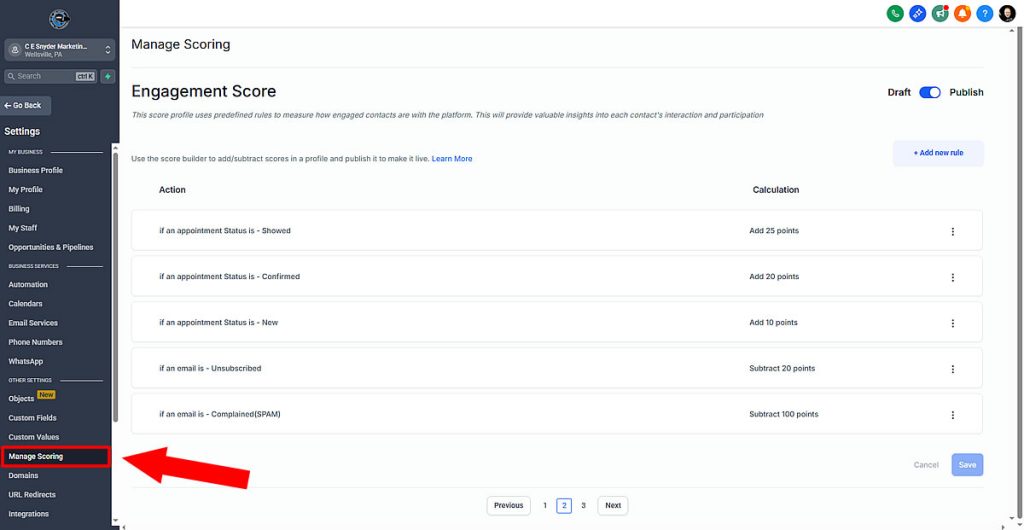
- Open Settings >> Manage Scoring in ROI Ninjas CRM.
- Create scoring rules for each bucket using built-in actions.
- Suggested starters you can tweak:
- Pricing page viewed: +10
- Appointment booked (confirmed): +25
- Email opened: +5
- Email link clicked: +10
- Any trigger link clicked: +10
- Subscribed to email list: +10
- Appointment showed: +25
- Order form submitted or payment confirmed: +100
- Unsubscribe: -100
- SPAM complaint: -1,000
Save and publish the rules. Also, the set applies account-wide. So scoring now runs natively without a workflow.
Optional: Build one small automation to react when Score or Score Band changes. Use it to auto-assign, create tasks, send internal alerts, create opportunities, and move pipeline stages.
Find leaks, fix listings, and win. The clear action plan: Marketing X-Ray Report! >>
Advanced Shortcuts for ROI Ninjas CRM Users
You can add power after native engagement scoring is live:
- Smart Lists: “Hot Today” and “Hot This Week” by score and recency.
- Owner Routing: Send A-leads to the right rep by zip or product.
- Instant Call Connect: Auto-dial A-leads during business hours.
- Priority Inbox: Pin A-leads to the top of conversations.
- Pipeline Stage Rules: Auto-move deals to Won on paid invoices.
- Score Decay: Subtract points after inactivity to keep numbers honest.
- Attribution by Score: Filter reports by A/B bands to see true ROI.
- Ad Audiences: Build lookalikes from A-leads and exclude D-leads.
- Local SEO Boost: Pair scoring with listings; see Dominate Local Search.
- Follow-Up Discipline: Learn cadence in Follow-Up or Fail.
Tired of confusing hype and conflicting information? Read our article More CRM Lies Exposed before you waste money.
Lead Scoring for SMBs Summary
Lead Scoring for SMBs shows how to rank leads using four signals. Also, ROI Ninjas CRM has native lead scoring, no workflows needed. So define a simple 100-point model and thresholds. But also turn scores into actions with alerts, tasks, and routing. Then, run a weekly tune-up to keep engagement scores honest.
Result: Faster follow-up, shorter sales cycles, and higher close rates.
If you don’t have ROI Ninjas CRM
Still shopping for CRMs and not sure which one is right for you? Read our article CRM Comparison for SMBs.
Fix it now. Turn on built-in Lead Scoring for SMBs in ROI Ninjas CRM.
Call winners first and bank the revenue you’ve been missing!
FAQs
Five minutes or less for A-Leads; slower responses lose deals.
No. ROI Ninjas CRM scores leads natively; automations only trigger actions.
Track time-to-first-touch, meetings booked, show rate, and wins by source.
Use A/B/C/D bands from scoring; call A-Leads first.